Dev License: This installation of WHMCS is running under a Development License and is not authorized to be used for production use. Please report any cases of abuse to abuse@whmcs.com

How to Enable Disable APIC, ACPI, VNC in SolusVM 1

SolusVM 1 allows you to enable or disable VNC, PAE, APIC, and ACPI.


1. Log in to your SolusVM 1 Control Panel.

2. If you have multiple VPSs, then select the appropriate one.
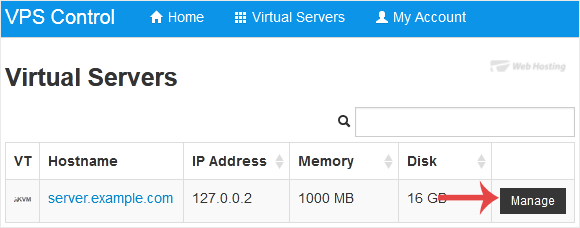
solusvm-select-vps.gif


3. Scroll down. Under the Settings tab you can find APIC, ACPI, VNC or PAE. If you want to turn off VNC, select the Off option from the drop-down menu under the VNC option.
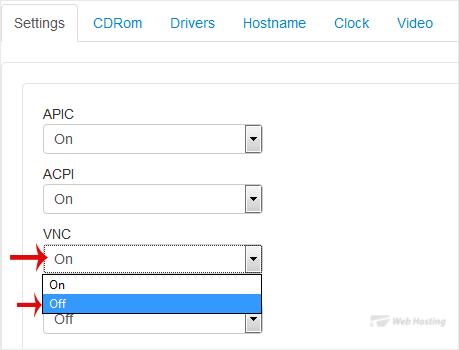
solusvm-vnc-on-off.gif


4. After making any changes, such as switching from On to Off or vice versa, reboot your VPS.

Now you know how to enable or disable APIC, ACPI, and VNC in SolusVM 1.

  • 0 Els usuaris han Trobat Això Útil
Ha estat útil la resposta?

Articles Relacionats

How to Reboot/Restart VPS in SolusVM 1

You can restart VPS via the command line or SolusVM 1. How to Reboot/Restart a VPS via SolusVM...

How to Forcefully or Gracefully Shut Down the VPS in SolusVM 1

You can shut down the VPS in two ways - forcefully or gracefully in SolusVM 1. How to...

How to Start/Boot Your VPS in SolusVM 1

If your VPS is down/offline, you can start it using SolusVM 1.1. Log in to your SolusVM 1 Control...

How to Access VPS via VNC in SolusVM 1

You can access your VPS via VNC in an emergency, such as when a firewall blocks your IP, the...

How to Reinstall OS Using SolusVM 1 OS-Reinstaller

You can easily Install/Reinstall the operating system using SolusVM 1. However, note that this...

Powered by WHMCompleteSolution