Dev License: This installation of WHMCS is running under a Development License and is not authorized to be used for production use. Please report any cases of abuse to abuse@whmcs.com

How to Create a Cronjob in cPanel

1. Log in to your cPanel account.


2. In the Advanced section, click on Cron Jobs.


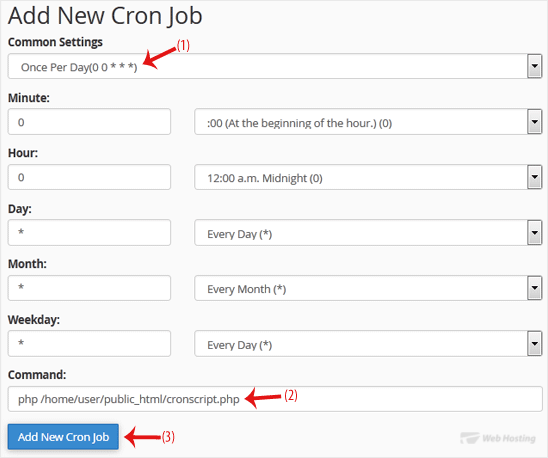
3. Under Add New Cron Job, click on the Common Settings drop-down menu and select an appropriate option such as Once Per Day or another suitable option.

4. Enter the location of your cron job PHP file or the command you want to run in the Command field.

5. Click on Add New Cron Job.

We hope this tutorial is helpful to you.

  • 0 A felhasználók hasznosnak találták ezt
Hasznosnak találta ezt a választ?

Kapcsolódó cikkek

How to Reset cPanel's Account Password

If you have access to your cPanel account, follow these steps to reset your password: 1. Log in...

How to Update cPanel Contact Information and Receive Resource Limit Notifications

If you want to receive a notification on reaching your disk quota, bandwidth usage limit or wish...

How to Change cPanel's Style/Theme

Switching over to another cPanel theme with a different style is easy.1. Log in to your cPanel...

How to Change the Language of Your cPanel Account

cPanel supports many languages. If you want to change your cPanel language to a native one, you...

How to Upload Files via the cPanel File Manager

You can use cPanel's built-in file manager instead of an FTP program to manage your website...

Powered by WHMCompleteSolution